EMRA MobilEM
- 3.1
- Rating
- 10.00K
- Installs
- Free
- Price
 Analysis by App-foxy
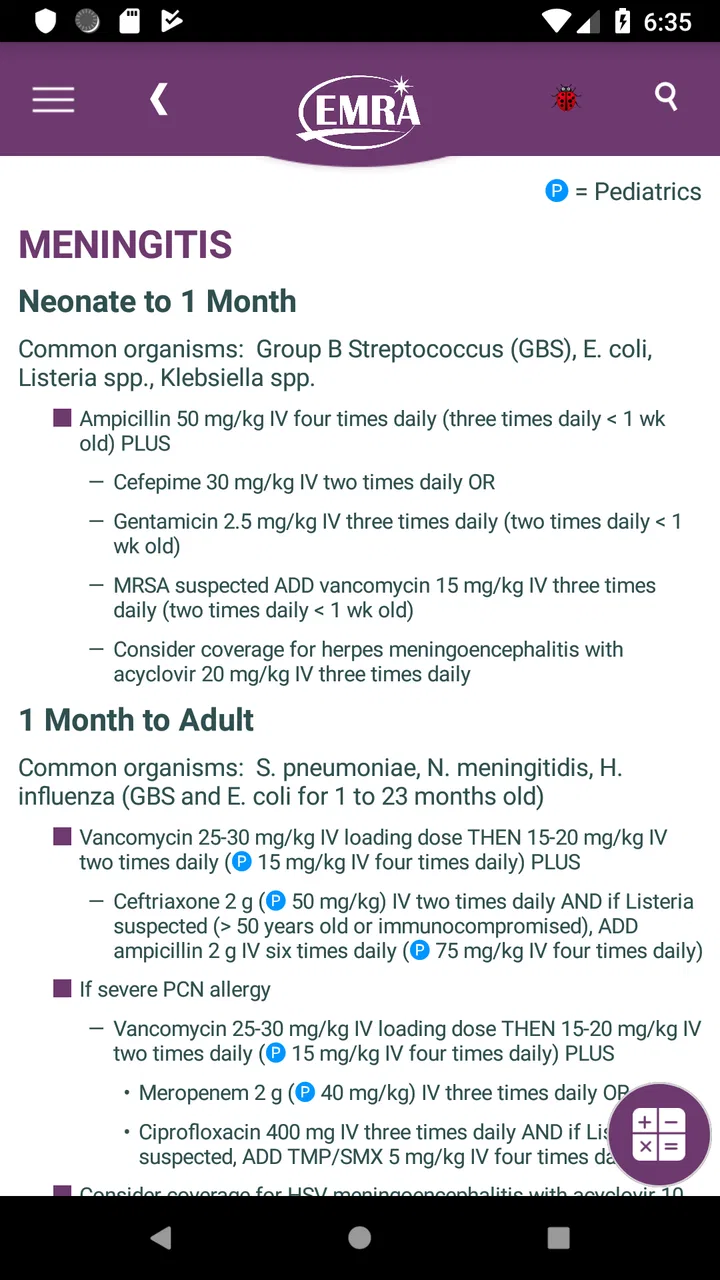
When I look at a medical reference app, I am not mainly asking whether it looks impressive. I want to know whether it can help me move from a clinical question to a sensible next step without creating extra friction. EMRA MobilEM is built around that practical need. Developed by the Emergency Medicine Residents' Association, it presents itself as a free medical app for fast, evidence-based guidance, aimed especially at people working or studying in emergency medicine.
My overall impression is that it makes the most sense as a focused companion rather than a complete replacement for clinical training, local protocols, or a full medical reference library. Its strongest appeal is the promise of quick access when time matters. Its weaker side is that a modest store presence, an average rating of 3.1 from around 38 ratings, and the possibility of paid items mean I would want to test its workflow personally before relying on it during demanding shifts.
How EMRA MobilEM feels in real clinical use
I find the most useful way to judge a clinical reference is to ask what it can help me check—and what still needs a clinician’s judgment. In this section, I’ll focus on the practical boundary between a quick reference and a decision-making tool, then turn to the visible choices users can make when handling sensitive clinical moments.
You May Also Like

 Blood Strike: 2.5 Anniversary
Blood Strike’s Loadouts Turn Every Drop Into a Tactical Gamble
A close look at Blood Strike’s custom loadouts: how fast access to signature weapons reshapes its battle royale rhythm, rewards preparation, and narrows the gap between fights.

 Pandora - Music & Podcasts
Pandora’s Music Is Easy to Start, but Harder to Recover
Pandora’s strength is its low-effort path from a seed to a station. Its weak spot is how much confidence it asks you to place in connection, setup, and quiet recovery.

 8 Ball Pool
 Is Built on Rivalries, Rematches, and Routine
A close look at the rivalries, rematches, shared routines, and unanswered safety questions that turn a quick pool match into a persistent mobile community.

 Samsung Music
’s Quiet Strength Is Playing What You Already Own
Its reach comes less from spectacle than from dependable access to a personal library. That simplicity is both the app’s strongest retention engine and its ceiling.

 AccuWeather: Weather Radar
AccuWeather Review: A Quick, Clear Forecast for Everyday Decisions
For everyday plans, the best forecast is the one you can understand quickly. AccuWeather makes rain timing, radar, and local conditions easy to act on, with a few trade-offs.

 Hill Climb Racing
Why Hill Climb Racing Still Turns Crashes Into One More Run
A tiny car, a bumpy hill and one more upgrade: Hill Climb Racing keeps resurfacing because its simple chaos makes every near-miss feel personal.
More From Our News Desk
View All News


Speed expectations: useful when the question is narrow
The app's central idea is easy to understand: emergency medicine often involves short, urgent questions rather than leisurely reading. A trainee may need to refresh a medication point, check an approach to a presentation, or review a compact piece of guidance before discussing a patient. In that setting, a focused reference tool can be more useful than opening a broad textbook and searching through several layers of unrelated material.
I would approach MobilEM with that expectation. It is not the kind of app I would open for an extended study session unless its organization happens to suit the topic I am reviewing. Its value should come from reducing the distance between a question and a relevant answer. The phrase “fast, evidence-based guidance” sets the right direction, but speed in practice depends on how clearly the material is arranged and how quickly I can recognize the correct section.
That distinction matters. An app can contain excellent medical content and still feel slow if the user has to guess where information is stored. For emergency medicine, labels and wording are particularly important because a clinician may approach the same problem through a symptom, a diagnosis, a procedure, or a treatment decision. I would therefore spend a little time learning its internal structure before using it in a busy environment. That small preparation step could make a larger difference than simply installing it and hoping it will be self-explanatory.
For students, the app may also work as a rapid revision aid. I can imagine using it after a teaching session to revisit a topic while the details are still fresh, then returning to the same material before a placement. This is a different use from searching in front of a patient. In study mode, I can tolerate a slower path and read around a subject. In clinical mode, I need to identify the relevant guidance quickly and then verify that it applies to the specific situation.
One practical tip is to treat the first few sessions as orientation rather than emergency preparation. Open the sections you expect to use, notice the terminology, and decide whether the app's presentation matches the way you think through cases. If it does, the tool may feel faster over time because the main delay is no longer finding the right starting point.
Heavy-use moments: where a reference app earns its place
The most convincing use case is a busy emergency department shift in which several small uncertainties arrive close together. Imagine a junior clinician moving between patients, needing to refresh a point about an acute presentation while also preparing to speak with a senior colleague. A compact mobile reference can help organize that thought process, provided it is used as a support for reasoning rather than as an automatic decision-maker.
I would also see value during handover preparation. Before presenting a patient, I might use a reference app to review the key issues associated with the presentation and make sure I have not overlooked an important area of assessment. That does not replace the patient's history, examination, investigations, or local guidance. It simply gives me a structured prompt when fatigue or interruptions make it easy to miss a familiar step.
A less obvious use is deliberate comparison after a case. Once the immediate pressure has passed, I could revisit the relevant guidance and compare it with what happened in practice. This turns the app from a quick lookup tool into part of a learning loop: identify the question, manage the situation with appropriate supervision, then return to the topic and understand the reasoning more clearly. That workflow is more valuable than repeatedly opening the app without recording what I was trying to learn.
There is also a trade-off during heavy use. The more often I consult a reference, the more important it becomes to distinguish orientation from authorization. MobilEM may help me frame a clinical question, but it should not be treated as permission to act outside my training or local policy. In emergency care, details such as patient age, pregnancy, kidney function, allergies, comorbidities, available equipment, and regional protocols can change the correct action. A concise mobile entry cannot carry all of that context for me.
For that reason, I would use it most confidently for preparation, revision, and supervised clinical support. I would be more cautious if I were looking for a single definitive source for a complex case. A full reference service, institutional protocol, pharmacist, senior clinician, or specialist guideline may be the better choice when the decision is high risk or unusually complicated.
Reliability: content confidence is only part of the question
The developer gives this app a clear professional identity: the Emergency Medicine Residents' Association. That matters to me because the intended audience and specialty are not vague. The app is positioned around emergency medicine rather than general wellness, fitness, or casual symptom checking. Its age rating is Everyone, but that does not mean it is designed for unsupervised use by every reader. Medical content can be suitable for a broad store audience while still requiring professional judgment.
I would separate two kinds of reliability. The first is whether the guidance is medically useful and appropriately evidence-based. The second is whether the app behaves consistently when I need it. The store's average rating of 3.1 suggests that the experience has not been uniformly satisfying for all users, although a rating alone cannot tell me whether concerns relate to content, navigation, updates, device compatibility, or something else. I would regard that score as a reason to evaluate the app carefully, not as proof that it is unreliable.
In practical terms, I would never make it my only source during a critical decision. I would keep a second route available, such as institutional guidance or a trusted comprehensive reference. This is not a criticism unique to MobilEM; it is sensible with any mobile medical resource. Phones can run out of battery, networks can be inconsistent, apps can change, and a relevant topic may be presented at a level that does not fit the case in front of me.
Another useful habit is to check the context of an entry rather than stopping at the first sentence that appears relevant. A fast summary can be helpful, but the surrounding qualifications often determine whether the advice applies. I would pay attention to definitions, exceptions, contraindications, and any distinction between an initial emergency approach and later definitive management. That extra reading is especially important when the app is being used by someone early in training.
Recovery also matters. If I am interrupted while reading, I want to be able to return to the same topic without reconstructing my entire search. I cannot promise that every device or session will preserve my place in exactly the way I prefer, so I would not build a workflow that depends on perfect recovery. For important learning points, I would make a brief personal note or bookmark the relevant subject through whatever method the app and my institution allow.
Device constraints, storage choices, and paid content
MobilEM is free to download, which makes it easy to try without committing money at the start. It is listed for Everyone and has passed the threshold of over 10,000 installs, so it is not an obscure personal experiment with no visible audience. At the same time, the app includes in-app purchases ranging from $1.99 to $39.99 per item. That changes how I would evaluate it: I would first establish what is available at no cost, then decide whether any paid material genuinely fits my needs.
I would not assume that paying automatically makes the app better for my particular workflow. A student may only need a limited set of topics for revision, while a resident might value a broader collection. Someone already paying for a large medical reference service may find the extra purchase unnecessary. Before buying, I would look at the description of the individual item and ask whether it fills a real gap rather than simply adding more material to an already crowded phone.
Device limitations can affect a medical app in subtle ways. A small screen may make dense clinical text tiring to read, especially under bright department lighting or when I am moving between tasks. A larger phone or tablet could be more comfortable for study, while a phone remains more convenient for quick checks. I would also avoid relying on a nearly full device or an almost-empty battery. That is ordinary phone maintenance, but it becomes more important when the app is part of a clinical routine.
Resource demands should be judged by usefulness rather than by the number of features. An app that opens quickly but makes me scroll through poorly organized material is not efficient. Conversely, a content-rich app may justify a little more loading or storage if it substantially reduces searching. Since the app is a medical reference rather than a game or media platform, I would expect my main concern to be reading comfort and access to the right information, not visual effects or background activity.
One sensible device strategy is to install it before a shift, open the sections I expect to need, and confirm that my phone handles the app comfortably. I would not wait until an urgent question appears to discover that the text is difficult to navigate on my screen. I would also keep the phone's normal security habits in place and avoid displaying patient-identifying information while using any reference tool. The app can support clinical work, but it should not become a place to store confidential case details.
Who will benefit most from this app?
I think MobilEM is best suited to medical students, emergency medicine residents, and clinicians who want a specialty-focused companion for review and supervised point-of-care preparation. It may be particularly useful for people who prefer concise guidance over searching a broad database. The connection with the Emergency Medicine Residents' Association also gives the app a clear educational setting, which is more reassuring to me than an anonymous symptom checker making general claims.
It can also suit a learner who wants to connect classroom knowledge with real cases. After a shift, I could choose one presentation that challenged me, review the relevant material, and write down one question to discuss with a supervisor. That makes the app part of a reflective routine instead of a substitute for teaching. The benefit comes from combining the reference with feedback, not from treating the screen as the final authority.
I would skip it if I were a member of the public looking for a diagnosis or personal treatment plan. The Everyone rating describes store accessibility, not clinical suitability for self-diagnosis. A person with worrying symptoms should seek appropriate medical care rather than trying to interpret emergency medicine guidance alone. I would also look elsewhere if I needed a broad medical encyclopedia, a dedicated drug interaction checker, detailed patient education, or a tool built around a specific hospital's protocols.
It may not be the right choice for a clinician who wants one unified system for documentation, prescribing, calculations, communication, and reference. MobilEM should be considered a reference app, not a replacement for the wider clinical technology used in a department. The best alternative depends on the task: local protocols for institution-specific decisions, a comprehensive reference for breadth, and direct senior advice for uncertainty that carries immediate risk.
What I would do before depending on it
My first test would be simple. I would choose several common emergency medicine questions, time how naturally I can locate the relevant material, and note whether the wording is clear enough for my level of training. I would repeat the test when tired or distracted, because an app that feels intuitive at home may feel very different during a crowded shift. I would also check which sections are accessible without buying anything and whether the paid items correspond to subjects I actually need.
Next, I would compare a few entries with the guidance already used in my workplace or training program. This is not about expecting every source to use identical wording. It is about learning where MobilEM fits: perhaps as a rapid orientation tool, perhaps as a revision resource, or perhaps as a useful supplement for selected topics. That comparison would also reveal when local policy should take priority.
Finally, I would decide on a backup. If the app becomes unavailable, I should still know where to find the relevant institutional guidance and whom to ask. That preparation prevents a mobile reference from becoming a single point of failure. It also keeps the role of the app clear: it helps me think and review, while accountability remains with the trained clinical team and the established care process.
Performance verdict: promising as a focused companion, not a complete safety net
My verdict is cautiously positive. The app has a clear specialty, a credible developer identity, and a practical purpose that fits the pace of emergency medicine. Its free entry point makes experimentation easy, while the optional purchases mean I would examine the available material before spending anything. I can see genuine value in using it for rapid orientation, structured revision, and post-shift learning.
However, I would not recommend it as the only medical resource on a device. The average rating of 3.1, the need to judge its navigation personally, and the normal limitations of mobile reference content all argue for a measured approach. Its performance is best understood as workflow performance: how quickly I can reach useful guidance, how comfortably I can read it, and how well it supports—not replaces—clinical judgment.
If you are studying or working in emergency medicine and want a focused app to test alongside your existing resources, I think EMRA MobilEM is worth exploring. Start with free content, learn its organization before a busy shift, compare important guidance with local practice, and keep a reliable backup. Use it to sharpen decisions, never to outsource them. For me, that is the most honest way to recommend it: useful in the right hands and the right situation, but strongest as one part of a broader medical learning and safety system.
FAQs for EMRA MobilEM
01What is EMRA MobilEM and what can I use it for?
EMRA MobilEM is a mobile application associated with Turkey’s Energy Market Regulatory Authority (EPDK). It is designed to provide users with access to energy-market information, announcements, regulatory content, and related services from a smartphone. Depending on the current version and user profile, the app may also offer access to sector data, notifications, documents, or institutional tools. Its usefulness is greatest for people who regularly follow Turkey’s electricity, natural gas, petroleum, or LPG markets.
02Who is EMRA MobilEM intended for?
The application is primarily aimed at energy-sector professionals, companies, license holders, public institutions, researchers, and users who need official information from EMRA. Some content may be available to everyone without signing in, while other services can require an authorized account or institutional credentials. Before downloading, users should understand that this is not necessarily a general consumer utility app for paying energy bills or managing a household subscription.
03Does EMRA MobilEM require registration or login?
Some features of EMRA MobilEM may be accessible immediately after installation, such as public announcements, news, or regulatory information. However, services involving personal data, company records, applications, reporting, or protected documents may require login and appropriate authorization. Registration requirements can vary according to the user’s role and the version of the app. If you are downloading it for professional use, keep your official credentials available and check the sign-in instructions provided by EMRA.
04Is EMRA MobilEM free to download and use?
EMRA MobilEM is generally distributed as a free application, so users normally do not pay an installation fee through the official Android or iOS store. Nevertheless, accessing the app may use mobile data, and certain professional services could depend on an existing institutional account or authorization rather than a separate in-app purchase. Always download it from an official store or EMRA source, verify the publisher name, and review the latest permissions and privacy information before installation.
05Is EMRA MobilEM safe and available for both Android and iPhone?
The safest way to use EMRA MobilEM is to install the official version published through a recognized Google Play or Apple App Store listing, rather than downloading an unofficial APK or modified package. Store availability, supported operating-system versions, and update frequency may change over time. Before installing, compare the developer information, app icon, description, and recent update details with EMRA’s official website. Also review requested permissions and avoid sharing login details with third parties.
Pros
- Provides quick access to emergency medical records on the go.
- Can help healthcare staff make faster
- better-informed decisions.
- Useful for keeping important health details available during travel.
- Designed to support communication between patients and medical services.
- May reduce the need to carry printed medical documents.
Cons
- Requires accurate
- up-to-date information to be genuinely useful.
- Access may depend on an internet connection or service availability.
- Not a substitute for calling emergency services in a critical situation.
- Privacy concerns may arise when storing sensitive medical information digitally.
- Compatibility and available features may vary by region or healthcare provider.

EMRA MobilEM
Gallery